String militaryTimeFormat = "HH:mm";
String input = DateTime.Now.ToString(militaryTimeFormat);
DateTime time = DateTime.ParseExact(input, militaryTimeFormat, null);
string militaryTime = "06/12/2008 20:30";
IFormatProvider culture = new System.Globalization.CultureInfo("en-US", true);
DateTime militaryDate =DateTime.Parse(militaryTime, culture, System.Globalization.DateTimeStyles.NoCurrentDateDefault);
string g=DateTime.Now.ToString("dd/MM/yyyy HH:mm");
string h = DateTime.Now.ToString("HH:mm");
Friday, July 18, 2008


Tuesday, July 15, 2008
Creation of Gantt Chart using Java Script
Output:


function Gantt(gDiv)
{
var _GanttDiv = gDiv;
var _taskList = new Array();
this.AddTaskDetail = function(value)
{
_taskList.push(value);
}
this.Draw = function()
{
var _offSet = 0;
var _dateDiff = 0;
var _currentDate = new Date();
var _maxDate = new Date();
var _minDate = new Date();
var _dTemp = new Date();
var _firstRowStr = "
";
_gStr = _firstRowStr + _gStr;
for(i = 0; i < _taskList.length; i++)
{
_offSet = (Date.parse(_taskList[i].getFrom()) - Date.parse(_minDate))
/ (24 * 60 * 60 * 1000);
_dateDiff = (Date.parse(_taskList[i].getTo()) - Date.parse(_taskList
[i].getFrom())) / (24 * 60 * 60 * 1000) + 1;
_gStr += "
+ "


function Gantt(gDiv)
{
var _GanttDiv = gDiv;
var _taskList = new Array();
this.AddTaskDetail = function(value)
{
_taskList.push(value);
}
this.Draw = function()
{
var _offSet = 0;
var _dateDiff = 0;
var _currentDate = new Date();
var _maxDate = new Date();
var _minDate = new Date();
var _dTemp = new Date();
var _firstRowStr = "
| style='width:200px;'>Task | ";||||||||
| "; | " + _dTemp.getDate() + " | ";style='height:" + (_taskList.length * 21) + "'> "; | style='height:" + (_taskList.length * 21) + "'> "; | " + _dTemp.getDate() + " | ";"; | "; | T" + (_dTemp.getMonth() + 1) + "/" + _dTemp.getFullYear() + " | "; T" + (_dTemp.getMonth() + 1) + "/" + _dTemp.getFullYear() + " | ";
_gStr = _firstRowStr + _gStr;
for(i = 0; i < _taskList.length; i++)
{
_offSet = (Date.parse(_taskList[i].getFrom()) - Date.parse(_minDate))
/ (24 * 60 * 60 * 1000);
_dateDiff = (Date.parse(_taskList[i].getTo()) - Date.parse(_taskList
[i].getFrom())) / (24 * 60 * 60 * 1000) + 1;
_gStr += "
style='float:left; width:" + (27 * _dateDiff - 1) + "px;'>" +
getProgressDiv(_taskList[i].getProgress()) + "
style='float:left; padding-left:3'>" + _taskList[i].getResource() getProgressDiv(_taskList[i].getProgress()) + "
+ "
_gStr += "
" + _taskList[i].getTask() + "
"; }_GanttDiv.innerHTML = _gStr;
}
}
}
function getProgressDiv(progress)
{
return ""
}
// GET NUMBER OF DAYS IN MONTH
function getDaysInMonth(month, year)
{
var days;
switch(month)
{
case 1:
case 3:
case 5:
case 7:
case 8:
case 10:
case 12:
days = 31;
break;
case 4:
case 6:
case 9:
case 11:
days = 30;
break;
case 2:
if (((year% 4)==0) && ((year% 100)!=0) || ((year% 400)==0))
days = 29;
else
days = 28;
break;
}
return (days);
}

StyleSheet.css:
body {
}
/*----- SICON GANTT CHART STYLE CLASSES --------------------------
* DESCRIPTION : Theses class is required for SIcon Gantt Chart
* NOTE : Should change the color, the text style only
*----------------------------------------------------------------*/
.Gantt
{
font-family:tahoma, arial, verdana;
font-size:11px;
}
.GTaskTitle
{
font-family:tahoma, arial, verdana;
font-size:11px;
font-weight:bold;
}
.GMonth
{
padding-left:5px;
font-family:tahoma, arial, verdana;
font-size:11px;
font-weight:bold;
}
.GToday
{
background-color: #FDFDE0;
}
.GWeekend
{
font-family:tahoma, arial, verdana;
font-size:11px;
background-color:#F5F5F5;
text-align:center;
}
.GDay
{
font-family:tahoma, arial, verdana;
font-size:11px;
text-align:center;
}
.GTask
{
border-top:1px solid #CACACA;
border-bottom:1px solid #CACACA;
height:14px;
background-color:yellow;
}
.GProgress
{
background-color:black;
height:2px;
overflow: hidden;
margin-top:5px;
}
Dynamic Creation of Controls
Output:

Firstly add a panel control ,a textbox and a button to design page .when we enter a number in textbox at run time ,the same number controls are created at runtime.
Source Code:
protected void btninsert_Click(object sender, EventArgs e)
{
int count =Convert.ToInt32(TextBox1.Text);
Panel1.Controls.Clear();
Table tb = new Table();
tb.GridLines = GridLines.Both;
for (int i = 0; i < count; i++)
{
TableCell c1 = new TableCell();
TableRow rw = new TableRow();
TextBox tx = new TextBox();
c1.Controls.Add(tx);
rw.Cells.Add(c1);
tb.Rows.Add(rw);
}
Panel1.Controls.Add(tb);
}

Firstly add a panel control ,a textbox and a button to design page .when we enter a number in textbox at run time ,the same number controls are created at runtime.
Source Code:
protected void btninsert_Click(object sender, EventArgs e)
{
int count =Convert.ToInt32(TextBox1.Text);
Panel1.Controls.Clear();
Table tb = new Table();
tb.GridLines = GridLines.Both;
for (int i = 0; i < count; i++)
{
TableCell c1 = new TableCell();
TableRow rw = new TableRow();
TextBox tx = new TextBox();
c1.Controls.Add(tx);
rw.Cells.Add(c1);
tb.Rows.Add(rw);
}
Panel1.Controls.Add(tb);
}
Wednesday, June 4, 2008
Paging Advantage of Datalist Control in asp.net with c#
HTML Coding :

Server Side Coding: c#
SqlConnection scn = new SqlConnection("Data Source=.;Initial Catalog=iptv_database;Integrated Security=True");
int Start;
protected void Page_Load(object sender, EventArgs e)
{
if (!Page.IsPostBack)
{
ViewState["Start"] = 0;
BindData();
}
}
void BindData()
{
SqlDataAdapter da = new SqlDataAdapter("select * from addprogram", scn);
DataSet ds= new DataSet();
Start = (int)ViewState["Start"];
ViewState["Size"] = 2;
da.Fill(ds,Start,(int)ViewState["Size"], "addprogram");
DataList1.DataSource = ds;
DataList1.DataBind();
}
protected void lnkPrevious_Click(object sender, EventArgs e)
{
Start = (int)ViewState["Start"] - (int)ViewState["Size"];
ViewState["Start"] = Start;
if (Start <= 0)
{
ViewState["Start"] = 0;
}
BindData();
}
protected void lnkNext_Click(object sender, EventArgs e)
{
int count = DataList1.Items.Count;
Start = (int)ViewState["Start"] + (int)ViewState["Size"];
ViewState["Start"] = Start;
if (count <(int)ViewState["Size"])
{
ViewState["Start"] = (int)ViewState["Start"] + (int)ViewState["Size"];
Start = (int)ViewState["Start"];
}

Server Side Coding: c#
SqlConnection scn = new SqlConnection("Data Source=.;Initial Catalog=iptv_database;Integrated Security=True");
int Start;
protected void Page_Load(object sender, EventArgs e)
{
if (!Page.IsPostBack)
{
ViewState["Start"] = 0;
BindData();
}
}
void BindData()
{
SqlDataAdapter da = new SqlDataAdapter("select * from addprogram", scn);
DataSet ds= new DataSet();
Start = (int)ViewState["Start"];
ViewState["Size"] = 2;
da.Fill(ds,Start,(int)ViewState["Size"], "addprogram");
DataList1.DataSource = ds;
DataList1.DataBind();
}
protected void lnkPrevious_Click(object sender, EventArgs e)
{
Start = (int)ViewState["Start"] - (int)ViewState["Size"];
ViewState["Start"] = Start;
if (Start <= 0)
{
ViewState["Start"] = 0;
}
BindData();
}
protected void lnkNext_Click(object sender, EventArgs e)
{
int count = DataList1.Items.Count;
Start = (int)ViewState["Start"] + (int)ViewState["Size"];
ViewState["Start"] = Start;
if (count <(int)ViewState["Size"])
{
ViewState["Start"] = (int)ViewState["Start"] + (int)ViewState["Size"];
Start = (int)ViewState["Start"];
}
Saturday, May 31, 2008
Creating Controls at Runtime
TextBox txt1 = new TextBox();
TextBox txt2 = new TextBox();
txt1.Text = "This is the textbox inside the placeholder";
txt2.Text = "This is the textbox inside the panel";
txt1.Style["width"] = "250px";
txt2.Style["width"] = "250px";
PlaceHolder1.Controls.Add(txt1);
Panel1.Controls.Add(txt2);
TextBox txt2 = new TextBox();
txt1.Text = "This is the textbox inside the placeholder";
txt2.Text = "This is the textbox inside the panel";
txt1.Style["width"] = "250px";
txt2.Style["width"] = "250px";
PlaceHolder1.Controls.Add(txt1);
Panel1.Controls.Add(txt2);
Friday, May 9, 2008
VideoStreaming in asp.net with c#
using System.IO;
using System.IO.Compression;
FileStream sourceFile;
GZipStream compStream;
FileStream destFile;
protected void btnCompress_Click1(object sender, EventArgs e)
{
if (File1.PostedFile != null)
{
txtSource.Text = File1.PostedFile.FileName.ToString();
}
sourceFile = File.OpenRead(txtSource.Text);
destFile = File.Create(txtDestination.Text);
compStream = new GZipStream(destFile, CompressionMode.Compress);
int theByte = sourceFile.ReadByte();
while (theByte != -1)
{
compStream.WriteByte((byte)theByte);
theByte = sourceFile.ReadByte();
}
sourceFile.Close();
destFile.Close();
}
protected void btnDecompress_Click(object sender, EventArgs e)
{
if (File1.PostedFile != null)
{
txtSource.Text = File1.PostedFile.FileName.ToString();
}
string srcFile = txtSource.Text;
string dstFile = txtDestination.Text;
FileStream fsIn = null; // will open and read the srcFile
FileStream fsOut = null; // will be used by the GZipStream for output to the dstFile
GZipStream gzip = null;
const int bufferSize = 4096;
byte[] buffer = new byte[bufferSize];
int count = 0;
{
fsIn = new FileStream(srcFile, FileMode.Open, FileAccess.Read, FileShare.Read);
fsOut = new FileStream(dstFile, FileMode.Create, FileAccess.Write, FileShare.None);
gzip = new GZipStream(fsIn, CompressionMode.Decompress, true);
while (true)
{
count = gzip.Read(buffer, 0, bufferSize);
if (count != 0)
{
fsOut.Write(buffer, 0, count);
}
if (count != bufferSize)
{
// have reached the end
break;
}
}
}
}
}
using System.IO.Compression;
FileStream sourceFile;
GZipStream compStream;
FileStream destFile;
protected void btnCompress_Click1(object sender, EventArgs e)
{
if (File1.PostedFile != null)
{
txtSource.Text = File1.PostedFile.FileName.ToString();
}
sourceFile = File.OpenRead(txtSource.Text);
destFile = File.Create(txtDestination.Text);
compStream = new GZipStream(destFile, CompressionMode.Compress);
int theByte = sourceFile.ReadByte();
while (theByte != -1)
{
compStream.WriteByte((byte)theByte);
theByte = sourceFile.ReadByte();
}
sourceFile.Close();
destFile.Close();
}
protected void btnDecompress_Click(object sender, EventArgs e)
{
if (File1.PostedFile != null)
{
txtSource.Text = File1.PostedFile.FileName.ToString();
}
string srcFile = txtSource.Text;
string dstFile = txtDestination.Text;
FileStream fsIn = null; // will open and read the srcFile
FileStream fsOut = null; // will be used by the GZipStream for output to the dstFile
GZipStream gzip = null;
const int bufferSize = 4096;
byte[] buffer = new byte[bufferSize];
int count = 0;
{
fsIn = new FileStream(srcFile, FileMode.Open, FileAccess.Read, FileShare.Read);
fsOut = new FileStream(dstFile, FileMode.Create, FileAccess.Write, FileShare.None);
gzip = new GZipStream(fsIn, CompressionMode.Decompress, true);
while (true)
{
count = gzip.Read(buffer, 0, bufferSize);
if (count != 0)
{
fsOut.Write(buffer, 0, count);
}
if (count != bufferSize)
{
// have reached the end
break;
}
}
}
}
}
Monday, April 28, 2008
RSS Feeds in asp.net with c#
A simple Program to view xml in Datagrid
using System.Xml;
XmlTextReader reader = new XmlTextReader("http://msdn.microsoft.com/rss.xml");
// creates a new instance of DataSet
DataSet ds = new DataSet();
// Reads the xml into the dataset
ds.ReadXml(reader);
// Assigns the data table to the datagrid
myDataGrid.DataSource = ds.Tables[2];
// Binds the datagrid
myDataGrid.DataBind();
using System.Xml;
XmlTextReader reader = new XmlTextReader("http://msdn.microsoft.com/rss.xml");
// creates a new instance of DataSet
DataSet ds = new DataSet();
// Reads the xml into the dataset
ds.ReadXml(reader);
// Assigns the data table to the datagrid
myDataGrid.DataSource = ds.Tables[2];
// Binds the datagrid
myDataGrid.DataBind();
Subscribe to:
Comments (Atom)
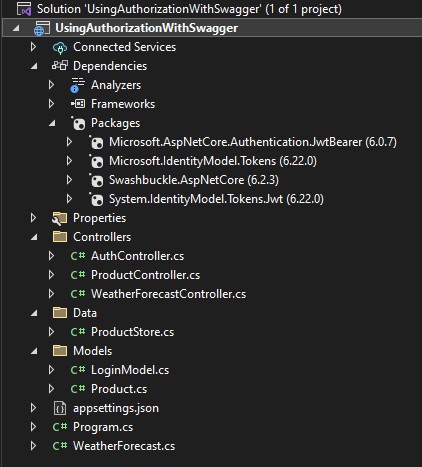
Using Authorization with Swagger in ASP.NET Core
Create Solution like below LoginModel.cs using System.ComponentModel.DataAnnotations; namespace UsingAuthorizationWithSwagger.Models { ...
-
 Codebehind C#: public static Bitmap CreateFirstCard(string Name,string MembNo,string Mobile,string Phone, ...
 -
VideoGallery.aspx <div class="matter-area fl"> <h2>Videos</h2> <p> <asp:Repeater ID=...
-
 Inbox.aspx <%@ Page Title="" Language="C#" MasterPageFile="~/Marketing/admin.master" EnableEventValid...