Sunday, October 1, 2017

Angular 2 Tutorial

Angular 2 is an open source JavaScript framework to build web applications in HTML and JavaScript.

Features of Angular 2

Following are the key features of Angular 2 −
  • Components − The earlier version of Angular had a focus of Controllers but now has changed the focus to having components over controllers. Components help to build the applications into many modules. This helps in better maintaining the application over a period of time.
  • TypeScript − The newer version of Angular is based on TypeScript. This is a superset of JavaScript and is maintained by Microsoft.
  • Services − Services are a set of code that can be shared by different components of an application. So for example if you had a data component that picked data from a database, you could have it as a shared service that could be used across multiple applications.
In addition, Angular 2 has better event-handling capabilities, powerful templates, and better support for mobile devices.

Components of Angular 2

Angular 2 has the following components −
  • Modules − This is used to break up the application into logical pieces of code. Each piece of code or module is designed to perform a single task.
  • Component − This can be used to bring the modules together.
  • Templates − This is used to define the views of an Angular JS application.
  • Metadata − This can be used to add more data to an Angular JS class.
  • Service − This is used to create components which can be shared across the entire application.
https://angular.io/

What is NPM?

npm is a NodeJS package manager. As its name would imply, you can use it toinstall node programs. Also, if you use it in development, it makes it easier to specify and link dependencies.

Saturday, May 21, 2016

Best Accounting Software for Really Small Businesses: Eazy Accounts

Eazy Accounts offers all the basic features like invoicing, customer order, bill payments, expense reports, financial reports and reconciliations that micro businesses need, as well as advanced tools that grow with your business. Furthermore, compared with other accounting software for really small businesses, Eazy Accounts has the best price for all of its capabilities.


  •  Masters
1.       Branch
2.       Category Type                                                                          
3.       Category     
4.       Cash Accounts                                          
5.       Bank
6.       First Account Balance            
7.       Store                            
8.       First Stock Input
9.       Country                                                                       
10.   State                                            
11.   District
12.   Financial Year                            
  • Employee
1.       Designation
2.       Department
3.       Qualification
4.       User Group
5.       Employee
6.       Users Details
7.       Privilege
8.       Monthly Salary
  • Purchase
1.       Purchase Invoice (Barcode scanner integration)
2.       Purchase Return Invoice
3.       Payment Voucher
4.       Supplier
5.       Product (Barcode scanner integration)
6.       Stock Transfer
  • Sales
1.       Sale Invoice(Barcode scanner integration)
2.       Sale Return Invoice
3.       Receipt Voucher
4.       Customer
  • Wholesale
1.       Add Output Item
2.       Edit Output Item
3.       Sales Invoice For Output Product     
  • Reports
1.       Daily Report
2.       Monthly Report
3.       Yearly Report
4.       Cash Credit Purchase
5.       Suppliers Account
6.       Cash Credit Sale
7.       Customers Account
8.       Cash/Bank Account
9.       Motion Inquiry
10.   Store Product Quantity
11.   Display Product Balance
12.   Product Low Quantity
13.   Product Motions Inquiry
14.   Profit Sale
15.   Motion Sales Total

Saturday, March 12, 2016

SELECT Column Value from Table to SET Variable

DECLARE @P_RET_VAL INT;

SET @P_RET_VAL = ( SELECT [PD_Id]
FROM [Products]  
WHERE [PD_No] = @PD_No
 )

Sunday, May 24, 2015

ASP.NET MVC - Views


The Views folder stores the files (HTML files) related to the display of the application (the user interfaces). These files may have the extensions html, asp, aspx, cshtml, and vbhtml, depending on the language content.The Views folder contains one folder for each controller. Visual Web Developer has created an Account folder, a Home folder, and a Shared folder (inside the Views folder).The Account folder contains pages for registering and logging in to user accounts.The Home folder is used for storing application pages like the home page and the about page.The Shared folder is used to store views shared between controllers (master pages and layout pages).


ASP.NET File Types

The following HTML file types can be found in the Views Folder:
File Type
Extention
Plain HTML
.htm or .html
Classic ASP
.asp
Classic ASP.NET
.aspx
ASP.NET Razor C#
.cshtml
ASP.NET Razor VB
.vbhtml

The Index File

The file Index.cshtml represents the Home page of the application. It is the application's default file (index file).
Put the following content in the file:

@{
    ViewBag.Title = "Home Page";
}
@section featured {
    <section class="featured">
        <div class="content-wrapper">
            <hgroup class="title">
                <h1>@ViewBag.Title.</h1>
                <h2>@ViewBag.Message</h2>
            </hgroup>
            <p>
                To learn more about ASP.NET MVC visit
                <a href="http://asp.net/mvc" title="ASP.NET MVC Website">http://asp.net/mvc</a>.
                The page features <mark>videos, tutorials, and samples</mark> to help you get the most from ASP.NET MVC.
                If you have any questions about ASP.NET MVC visit
                <a href="http://forums.asp.net/1146.aspx/1?MVC" title="ASP.NET MVC Forum">our forums</a>.
            </p>
        </div>
    </section>
}
<h3>We suggest the following:</h3>
<ol class="round">
    <li class="one">
        <h5>Getting Started</h5>
        ASP.NET MVC gives you a powerful, patterns-based way to build dynamic websites that
        enables a clean separation of concerns and that gives you full control over markup
        for enjoyable, agile development. ASP.NET MVC includes many features that enable
        fast, TDD-friendly development for creating sophisticated applications that use
        the latest web standards.
        <a href="http://go.microsoft.com/fwlink/?LinkId=245151">Learn more…</a>
    </li>

    <li class="two">
        <h5>Add NuGet packages and jump-start your coding</h5>
        NuGet makes it easy to install and update free libraries and tools.
        <a href="http://go.microsoft.com/fwlink/?LinkId=245153">Learn more…</a>
    </li>

    <li class="three">
        <h5>Find Web Hosting</h5>
        You can easily find a web hosting company that offers the right mix of features
        and price for your applications.
        <a href="http://go.microsoft.com/fwlink/?LinkId=245157">Learn more…</a>
    </li>
</ol>


The About File

The file About.cshtml represent the About page of the application.
Put the following content in the file:
 
@{
    ViewBag.Title = "About";
}

<hgroup class="title">
    <h1>@ViewBag.Title.</h1>
    <h2>@ViewBag.Message</h2>
</hgroup>

<article>
    <p>
        Use this area to provide additional information.
    </p>

    <p>
        Use this area to provide additional information.
    </p>

    <p>
        Use this area to provide additional information.
    </p>
</article>

<aside>
    <h3>Aside Title</h3>
    <p>
        Use this area to provide additional information.
    </p>
    <ul>
        <li>@Html.ActionLink("Home", "Index", "Home")</li>
        <li>@Html.ActionLink("About", "About", "Home")</li>
        <li>@Html.ActionLink("Contact", "Contact", "Home")</li>
    </ul>
</aside>


Run the Application

Select Debug, Start Debugging (or F5) from the Visual Web Developer menu.
Your application will look like this:


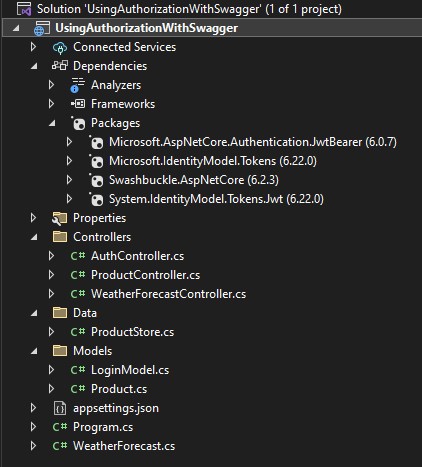
Using Authorization with Swagger in ASP.NET Core

 Create Solution like below LoginModel.cs using System.ComponentModel.DataAnnotations; namespace UsingAuthorizationWithSwagger.Models {     ...