Workflow means performing any task in order. Today, each application is based on workflow approach
and involves some processes to be executed. While creating an application, developers are still following
the traditional approach that leads to create steps in the process implicit in the code. This traditional
approach works fine, but requires a deep programming logic making the process difficult to change and execute.
Workflow engine is not a new technology; it came into existence in early 2000. In the market, several
workflow engines are available for Windows and other platforms. Today, all applications are based on
workflow approach. So, defining different engines for different applications is a cumbersome task. To
avoid this, Microsoft has decided to define a single common workflow engine for all the windows-based
applications. This is what the Windows Workflow Foundation (WF) performs. WF provides a common
workflow technology for all the windows-based applications, such as Microsoft Office 2007 and
Windows Share Point Services.
Tuesday, February 26, 2008


Data loading from SQL Server database at runtime
Firstly Add DataList Control in Design View.Then Change the html code of Datalist as follows:

Source Code:
using System;
using System.Data;
using System.Configuration;
using System.Collections;
using System.Web;
using System.Web.Security;
using System.Web.UI;
using System.Web.UI.WebControls;
using System.Web.UI.WebControls.WebParts;
using System.Web.UI.HtmlControls;
using System.Data.SqlClient;
public partial class dynamic : System.Web.UI.Page
{
SqlConnection con = new SqlConnection("Data Source=ELWIN;Initial Catalog=sherin;Integrated Security=True");
public void display(string query)
{
con.Open();
SqlDataAdapter da = new SqlDataAdapter(query, con);
DataTable dt = new DataTable();
da.Fill(dt);
DataView dv = new DataView(dt);
PagedDataSource objpag = new PagedDataSource();
objpag.DataSource = dv;
objpag.AllowPaging = true;
objpag.PageSize = 5;
DataList1.DataSource = objpag;
DataList1.DataBind();
con.Close();
}
public void check(object sender, System.Web.UI.WebControls.CommandEventArgs e)
{
if (Session["programid"] != null)
{
Session["programid"] = Session["programid"] + " or programid=" + e.CommandName;
}
else
{
Session["programid"] = e.CommandName;
}
string fg = Session["programid"].ToString();
Response.Redirect("shoppingcart.aspx");
}
protected void Page_Load(object sender, EventArgs e)
{
if (!Page.IsPostBack)
{
display("select * from addprogram2 ");
}
}
}
Output:


Source Code:
using System;
using System.Data;
using System.Configuration;
using System.Collections;
using System.Web;
using System.Web.Security;
using System.Web.UI;
using System.Web.UI.WebControls;
using System.Web.UI.WebControls.WebParts;
using System.Web.UI.HtmlControls;
using System.Data.SqlClient;
public partial class dynamic : System.Web.UI.Page
{
SqlConnection con = new SqlConnection("Data Source=ELWIN;Initial Catalog=sherin;Integrated Security=True");
public void display(string query)
{
con.Open();
SqlDataAdapter da = new SqlDataAdapter(query, con);
DataTable dt = new DataTable();
da.Fill(dt);
DataView dv = new DataView(dt);
PagedDataSource objpag = new PagedDataSource();
objpag.DataSource = dv;
objpag.AllowPaging = true;
objpag.PageSize = 5;
DataList1.DataSource = objpag;
DataList1.DataBind();
con.Close();
}
public void check(object sender, System.Web.UI.WebControls.CommandEventArgs e)
{
if (Session["programid"] != null)
{
Session["programid"] = Session["programid"] + " or programid=" + e.CommandName;
}
else
{
Session["programid"] = e.CommandName;
}
string fg = Session["programid"].ToString();
Response.Redirect("shoppingcart.aspx");
}
protected void Page_Load(object sender, EventArgs e)
{
if (!Page.IsPostBack)
{
display("select * from addprogram2 ");
}
}
}
Output:

Monday, February 25, 2008
Scott Guthrie

Scott Guthrie is a vice president in the Microsoft Developer Division. He runs the development teams that build ASP.NET, Common Language Runtime (CLR), Windows Presentation Foundation (WPF), Silverlight, Windows Forms, Internet Information Services 7.0, Commerce Server, .NET Compact Framework, Visual Web Developer and Visual Studio Tools for WPF. He is best known for his work on ASP.NET, which he and colleague Mark Anders developed while at Microsoft.[1]
SqlServer Database Connection in asp.net with C#
Microsoft SQL Server is a relational database management system (RDBMS) produced by Microsoft. Its primary query language is Transact-SQL, an implementation of the ANSI/ISO standard Structured Query Language (SQL) used by both Microsoft and Sybase.
Add SQL Connection in asp.net with c#:

How to get Connection String for SQLConnection :

Source Code :
using System;
using System.Data;
using System.Configuration;
using System.Collections;
using System.Web;
using System.Web.Security;
using System.Web.UI;
using System.Web.UI.WebControls;
using System.Web.UI.WebControls.WebParts;
using System.Web.UI.HtmlControls;
using System.Data.SqlClient;
public partial class data : System.Web.UI.Page
{
SqlConnection scn = new SqlConnection("Data Source=.;Initial Catalog=master;Integrated Security=True");
protected void Page_Load(object sender, EventArgs e)
{
}
}
Add SQL Connection in asp.net with c#:

How to get Connection String for SQLConnection :

Source Code :
using System;
using System.Data;
using System.Configuration;
using System.Collections;
using System.Web;
using System.Web.Security;
using System.Web.UI;
using System.Web.UI.WebControls;
using System.Web.UI.WebControls.WebParts;
using System.Web.UI.HtmlControls;
using System.Data.SqlClient;
public partial class data : System.Web.UI.Page
{
SqlConnection scn = new SqlConnection("Data Source=.;Initial Catalog=master;Integrated Security=True");
protected void Page_Load(object sender, EventArgs e)
{
}
}
Serial Communication with MSComm Control in windows application
Add Reference for Serial Communication:

Add MSComm Control For Serial Communication:

Serial Communication Form Design:

Source Code For Serial Communication:
using System;
using System.Collections.Generic;
using System.ComponentModel;
using System.Data;
using System.Drawing;
using System.Text;
using System.Windows.Forms;
using System.Globalization;
using System.IO;
using System.Diagnostics;
using System.Threading;
namespace mifaretest
{
public partial class Form2 : Form
{
public Form2()
{
InitializeComponent();
}
private static int num;
private static string st;
private void button1_Click(object sender, EventArgs e)
{
num = Convert.ToInt32(txtamt.Text);
st = num.ToString("X");
int bt = st.Length;
for (int i = 0; i < 8 - bt; i++)
{
st = "0" + st;
}
axMSComm1.Output = "+" + "04" + st;
Thread.Sleep(500);
if (axMSComm1.InBufferCount > 0)
{
string b = axMSComm1.Input.ToString();
string u = b.Substring(0, b.IndexOf("\r\n"));
int c = Convert.ToInt32(u, 16);
txtbal.Text = c.ToString();
}
}
private void Form2_Load(object sender, EventArgs e)
{
if (axMSComm1.PortOpen == false)
{
axMSComm1.PortOpen = true;
}
}
private void btnwithdrawal_Click(object sender, EventArgs e)
{
num = Convert.ToInt32(txtamt.Text);
st = num.ToString("X");
int bt = st.Length;
for ( int i = 0; i < 8 - bt; i++)
{
st = "0" + st;
}
axMSComm1.Output = "-" +"04" + st;
Thread.Sleep(500);
if (axMSComm1.InBufferCount > 0)
{
string b = axMSComm1.Input.ToString();
string u = b.Substring(0, b.IndexOf("\r\n"));
int c = Convert.ToInt32(u, 16);
txtbal.Text = c.ToString();
}
}
private static int i=0;
private static string x;
private static string c;
private static string p;
private static string s;
private static string l;
private static string r;
private static string t;
private static string v;
private static string u;
private static int k;
private void button2_Click(object sender, EventArgs e)
{
axMSComm1.Output = "x";
int o = axMSComm1.InBufferCount;
Thread.Sleep(500);
if (axMSComm1.InBufferCount > 0)
{
x = axMSComm1.Input.ToString();
}
axMSComm1.Output = "c";
Thread.Sleep(500);
if (axMSComm1.InBufferCount > 0)
{
c = axMSComm1.Input.ToString();
}
axMSComm1.Output = " ";
Thread.Sleep(500);
if (axMSComm1.InBufferCount > 0)
{
p = axMSComm1.Input.ToString();
}
axMSComm1.Output = "s";
Thread.Sleep(500);
if (axMSComm1.InBufferCount > 0)
{
s = axMSComm1.Input.ToString();
}
axMSComm1.Output = "l" + "01" + "FF" + "\r\n";
Thread.Sleep(500);
if (axMSComm1.InBufferCount > 0)
{
l = axMSComm1.Input.ToString();
}
axMSComm1.Output = "r" + "04";
Thread.Sleep(500);
if (axMSComm1.InBufferCount > 0)
{
r = axMSComm1.Input.ToString();
}
axMSComm1.Output = "r" + "04";
Thread.Sleep(500);
if (axMSComm1.InBufferCount > 0)
{
t = axMSComm1.Input.ToString();
}
Thread.Sleep(500);
axMSComm1.Output = "rv" + "04";
Thread.Sleep(500);
// string m = x + c + p + s + l + r + t;
if (axMSComm1.InBufferCount > 0)
{
v = axMSComm1.Input.ToString();
u = v.Substring(0, v.IndexOf("\r\n"));
k = Convert.ToInt32(u, 16);
k = Int32.Parse(u, NumberStyles.HexNumber);
txtbal.Text = k.ToString();
}
}
}
}

Add MSComm Control For Serial Communication:

Serial Communication Form Design:

Source Code For Serial Communication:
using System;
using System.Collections.Generic;
using System.ComponentModel;
using System.Data;
using System.Drawing;
using System.Text;
using System.Windows.Forms;
using System.Globalization;
using System.IO;
using System.Diagnostics;
using System.Threading;
namespace mifaretest
{
public partial class Form2 : Form
{
public Form2()
{
InitializeComponent();
}
private static int num;
private static string st;
private void button1_Click(object sender, EventArgs e)
{
num = Convert.ToInt32(txtamt.Text);
st = num.ToString("X");
int bt = st.Length;
for (int i = 0; i < 8 - bt; i++)
{
st = "0" + st;
}
axMSComm1.Output = "+" + "04" + st;
Thread.Sleep(500);
if (axMSComm1.InBufferCount > 0)
{
string b = axMSComm1.Input.ToString();
string u = b.Substring(0, b.IndexOf("\r\n"));
int c = Convert.ToInt32(u, 16);
txtbal.Text = c.ToString();
}
}
private void Form2_Load(object sender, EventArgs e)
{
if (axMSComm1.PortOpen == false)
{
axMSComm1.PortOpen = true;
}
}
private void btnwithdrawal_Click(object sender, EventArgs e)
{
num = Convert.ToInt32(txtamt.Text);
st = num.ToString("X");
int bt = st.Length;
for ( int i = 0; i < 8 - bt; i++)
{
st = "0" + st;
}
axMSComm1.Output = "-" +"04" + st;
Thread.Sleep(500);
if (axMSComm1.InBufferCount > 0)
{
string b = axMSComm1.Input.ToString();
string u = b.Substring(0, b.IndexOf("\r\n"));
int c = Convert.ToInt32(u, 16);
txtbal.Text = c.ToString();
}
}
private static int i=0;
private static string x;
private static string c;
private static string p;
private static string s;
private static string l;
private static string r;
private static string t;
private static string v;
private static string u;
private static int k;
private void button2_Click(object sender, EventArgs e)
{
axMSComm1.Output = "x";
int o = axMSComm1.InBufferCount;
Thread.Sleep(500);
if (axMSComm1.InBufferCount > 0)
{
x = axMSComm1.Input.ToString();
}
axMSComm1.Output = "c";
Thread.Sleep(500);
if (axMSComm1.InBufferCount > 0)
{
c = axMSComm1.Input.ToString();
}
axMSComm1.Output = " ";
Thread.Sleep(500);
if (axMSComm1.InBufferCount > 0)
{
p = axMSComm1.Input.ToString();
}
axMSComm1.Output = "s";
Thread.Sleep(500);
if (axMSComm1.InBufferCount > 0)
{
s = axMSComm1.Input.ToString();
}
axMSComm1.Output = "l" + "01" + "FF" + "\r\n";
Thread.Sleep(500);
if (axMSComm1.InBufferCount > 0)
{
l = axMSComm1.Input.ToString();
}
axMSComm1.Output = "r" + "04";
Thread.Sleep(500);
if (axMSComm1.InBufferCount > 0)
{
r = axMSComm1.Input.ToString();
}
axMSComm1.Output = "r" + "04";
Thread.Sleep(500);
if (axMSComm1.InBufferCount > 0)
{
t = axMSComm1.Input.ToString();
}
Thread.Sleep(500);
axMSComm1.Output = "rv" + "04";
Thread.Sleep(500);
// string m = x + c + p + s + l + r + t;
if (axMSComm1.InBufferCount > 0)
{
v = axMSComm1.Input.ToString();
u = v.Substring(0, v.IndexOf("\r\n"));
k = Convert.ToInt32(u, 16);
k = Int32.Parse(u, NumberStyles.HexNumber);
txtbal.Text = k.ToString();
}
}
}
}
Subscribe to:
Posts (Atom)
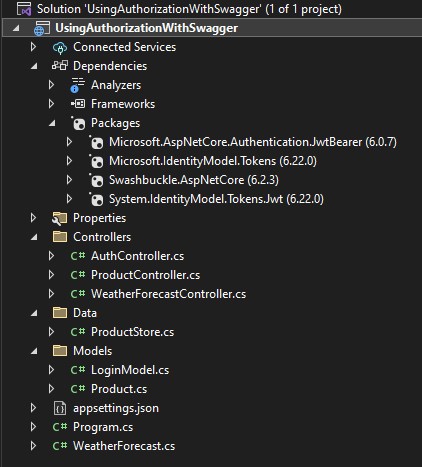
Using Authorization with Swagger in ASP.NET Core
Create Solution like below LoginModel.cs using System.ComponentModel.DataAnnotations; namespace UsingAuthorizationWithSwagger.Models { ...
-
 using System; using System.Collections.Generic; using System.ComponentModel; using System.Data; using System.D...
-
 Inbox.aspx <%@ Page Title="" Language="C#" MasterPageFile="~/Marketing/admin.master" EnableEventValid...
-
string[] Files; var root = Application.ExecutablePath; ...